Leader Of Frostphantom Configue cs2 settings, config & cfg 2016
| Full Name | - |
| Nickname | Leader Of Frostphantom Configue |
| Birthday | - |
| Nationality |  Malaysia Malaysia |
| Game |  Counter-Strike 2 Counter-Strike 2 |
| Since | 2016-11-01 |
| Last Update | 2016-11-01 |
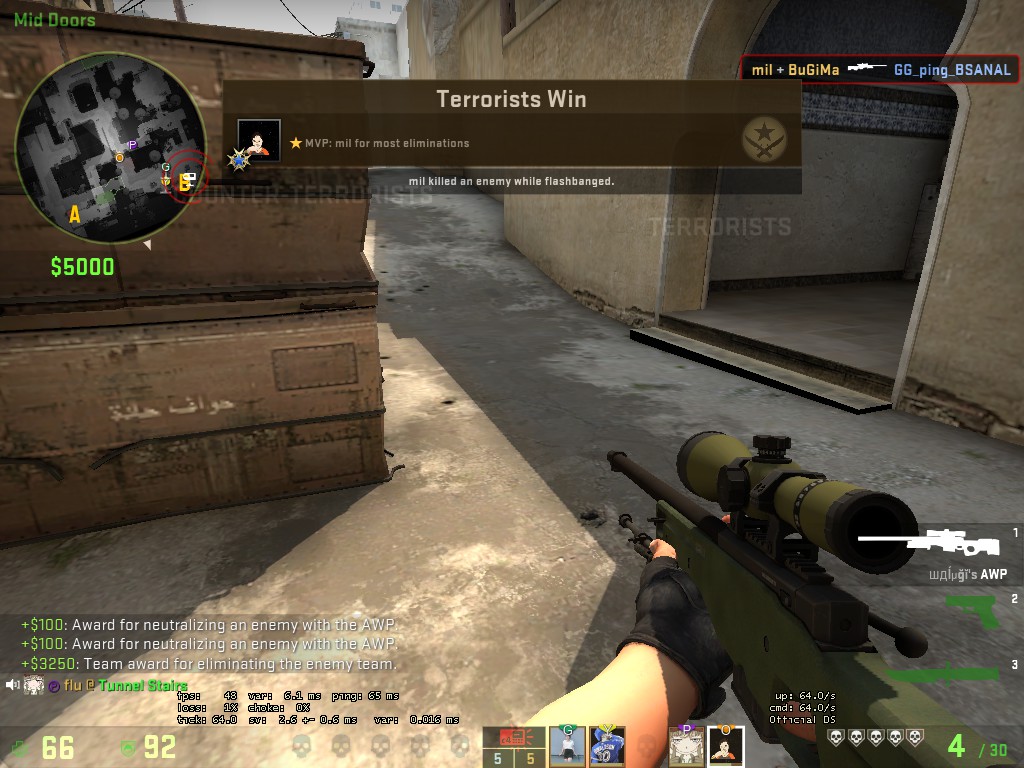
Leader Of Frostphantom Configue screenshot
Leader Of Frostphantom Configue Gear
| Mouse | - |
| Mousepad | - |
| Keyboard | - |
| Headset | - |
| Earbuds | - |
| Monitor | - |
| Chair | - |
| Controller | - |
| Case | - |
Leader Of Frostphantom Configue Gaming PC Setup
| GPU | - |
| CPU | - |
| Memory | - |
| Motherboard | - |
| Power Supply | - |
| Storage | - |
| Fan | - |
| Cooler | - |
Leader Of Frostphantom Configue config
The Counter-Strike 2 config file of Leader Of Frostphantom Configue has been downloaded 42 times. Download edmilson.cfg by clicking the download button below.
How to install Leader Of Frostphantom Configue cs2 config
1. Download edmilson.cfg by clicking the download button above.
2. Extract and/or copy file(s) into your Counter-Strike 2 folder (Example: C:\Program Files (x86)\Steam\userdata\STEAMID\730\local\cfg).
3. Launch the game and type in "exec configname.cfg" in console to load the config or make sure to add "exec autoexec.cfg", "exec userconfig.cfg" or "exec Leader Of Frostphantom Configue.cfg" to config.cfg file in your Counter-Strike 2 folder.
2. Extract and/or copy file(s) into your Counter-Strike 2 folder (Example: C:\Program Files (x86)\Steam\userdata\STEAMID\730\local\cfg).
3. Launch the game and type in "exec configname.cfg" in console to load the config or make sure to add "exec autoexec.cfg", "exec userconfig.cfg" or "exec Leader Of Frostphantom Configue.cfg" to config.cfg file in your Counter-Strike 2 folder.
Social Media
| Twitch | - |
| - | |
| YouTube | - |
| - | |
| - | |
| TikTok | - |
| Steam | - |
| Discord | - |
Leader Of Frostphantom Configue Settings
Monitor
| Resolution | - |
| Aspect Ratio | - |
| Display Mode | - |
| Brightness | - |
| Color Mode | - |
Video Advanced
| Global Shadow Quality | - |
| Model / Texture Detail | - |
| Texture Streaming | - |
| Effect Detail | - |
| Shader Detail | - |
| Boost Player Contrast | - |
| Multicore Rendering | - |
| Multisampling Anti-Aliasing Mode | - |
| FXAA Anti-Aliasing | - |
| Texture Filtering Mode | - |
| Wait for Vertical Sync | - |
| Motion Blur | - |
| Triple-Monitor Mode | - |
| Use Uber Shaders | - |
Viewmodel
| FOV | - |
| Offset X | - |
| Offset Y | - |
| Offset Z | - |
| Presetpos | - |
| Shift Left Amt | - |
| Shift Right Amt | - |
| Recoil | - |
| Righthand | - |
Viewmodel commands
Launch Options
Mouse
| DPI | - |
| Sensitivity | - |
| eDPI | - |
| Windows Sensitivity | - |
| Zoom Sensitivity | - |
| Raw Input | - |
| Acceleration | - |
Crosshair
| Draw Outline | - |
| Alpha | - |
| Color | - |
| Blue | - |
| Green | - |
| Red | - |
| Dot | - |
| Gap | - |
| Size | - |
| Style | - |
| Thickness | - |
| Sniper | - |
Crosshair commands
cl_bob
| Lower Amt | - |
| Amt Lat | - |
| Amt Vert | - |
| Cycle | - |
cl_bob commands
HUD
Radar
FAQ
Summary
This page contains the in-game settings, config files (cfg) and hardware setup of Leader Of Frostphantom Configue. The Leader Of Frostphantom Configue cs2 settings page has been viewed for 1.493 since it was added on 2016-11-01. The last time the settings of Leader Of Frostphantom Configue were on 2016-11-01. Visit the cs2 settings page to view more Counter-Strike 2 settings like Leader Of Frostphantom Configue or visit upload section to add your own cs2 settings.
Other Counter-Strike 2 settings
| # | Name | Country | Last Update | |
| 1 | |  Lithuania Lithuania | 2021-12-11 | |
| 2 | |  Poland Poland | 2024-05-10 | |
| 3 | |  Bosnia and Herzegovina Bosnia and Herzegovina | 2024-04-03 | |
| 4 | |  Mongolia Mongolia | 2020-01-17 | |
| 5 | |  Canada Canada | 2024-04-26 |
Other Malaysia gaming settings
| # | Name | Country | Last Update | |
| 1 | | Malaysia | 2020-10-12 | |
| 2 |  | Malaysia | 2022-09-19 | |
| 3 |  | Malaysia | 2021-04-14 | |
| 4 |  | Malaysia | 2022-08-20 | |
| 5 |  | Malaysia | 2024-04-08 | |
| 6 | | Malaysia | 2024-03-17 | |
| 7 | | Malaysia | 2024-04-26 | |
| 8 | | Malaysia | 2024-03-17 | |
| 9 | | Malaysia | 2024-05-21 | |
| 10 | | Malaysia | 2024-03-17 |
Leader Of Frostphantom Configue CFG file
con_enable "1"
echo Config Loaded! (1/2)
// Crosshair
cl_crosshair_drawoutline "0"
cl_crosshair_dynamic_maxdist_splitratio "0.35"
cl_crosshair_dynamic_splitalpha_innermod "1"
cl_crosshair_dynamic_splitalpha_outermod "0.5"
cl_crosshair_dynamic_splitdist "7"
cl_crosshair_outlinethickness "1"
cl_crosshair_sniper_width "1"
cl_crosshairalpha "200"
cl_crosshaircolor "1"
cl_crosshaircolor_b "0"
cl_crosshaircolor_g "0"
cl_crosshaircolor_r "0"
cl_crosshairdot "0"
cl_crosshairgap "-3"
cl_crosshairgap_useweaponvalue "0"
cl_crosshairscale "0"
cl_crosshairsize "4"
cl_crosshairstyle "4"
cl_crosshairthickness "1"
cl_crosshairusealpha "1"
cl_fixedcrosshairgap "3"
// Viewmodels
viewmodel_offset_x "2"
viewmodel_offset_y "2"
viewmodel_offset_z "-2"
viewmodel_fov "65"
// Bob
cl_bob_lower_amt "5"
cl_bobamt_lat "0.1"
cl_bobamt_vert "0.1"
cl_bobcycle "0.98"
cl_viewmodel_shift_left_amt "0"
cl_viewmodel_shift_right_amt "0"
// Bindings
bind "Mouse4" "+voicerecord"
bind "f1" "autobuy"
bind f3 "buy flashbang; buy smokegrenade; buy molotov; buy hegrenade"
bind "f4" "ignoremsg"
bind "f" "+lookatweapon"
bind "k" "say Heyy, that's pretty goodddd"
bind "leftarrow" "+left"
bind "rightarrow" "+right"
bind i "Suh dude :)~"
// No Tutorial or Info Messages
gameinstructor_enable "0"
cl_showhelp "0"
cl_autohelp "0"
cl_disablefreezecam "1"
cl_disablehtmlmotd "1"
// Rates
rate "128000"
cl_cmdrate "64"
cl_updaterate "64"
cl_interp_ratio "1"
cl_interp "0"
cl_lagcompensation "1"
cl_predict "1"
cl_predictweapons "1"
// Video
mat_monitorgamma "1.6"
mat_monitorgamma_tv_enabled "0"
// Sound
voice_scale "0.4" //Turns down the volume of other players voice to 40%
snd_mixahead "0.05" //Makes sound as instant as it can get, making it easier to hear small things
snd_musicvolume "0" //Turns off all music, easier to focus
// Net
fps_max "59"
net_graph "1"
net_graphheight "0"
net_graphmsecs "400"
net_graphpos "2"
net_graphproportionalfont "0"
net_graphshowinterp "1"
net_graphshowlatency "1"
net_graphsolid "1"
net_graphtext "1"
net_maxroutable "1200"
net_scale "5"
// Other
r_drawtracers_firstperson "0"
lobby_voice_chat_enabled "0"
cl_use_opens_buy_menu "0"
mm_dedicated_search_maxping "100"
// Mouse
m_rawinput "1"
m_mouseaccel2 "0"
m_mouseaccel1 "0"
m_customaccel "0"
sensitivity "1.65"
// Hud
hud_showtargetid "1"
cl_teammate_colors_show 2
cl_hud_bomb_under_radar "1"
cl_hud_color "8"
cl_hud_radar_scale "1"
cl_radar_scale "0.4"
cl_radar_always_centered "0"
cl_hud_playercount_showcount "0"
cl_hud_playercount_pos "1"
cl_hud_healthammo_style "1"
cl_hud_background_alpha "0.2"
cl_loadout_colorweaponnames "1"
cl_radar_icon_scale_min "1"
cl_showloadout "1"
hud_scaling "0.95"
// These commands make the hud go closer to the middle
safezonex "1.0"
safezoney "1.0"
echo Config Loaded! (2/2)
echo Config Loaded! (1/2)
// Crosshair
cl_crosshair_drawoutline "0"
cl_crosshair_dynamic_maxdist_splitratio "0.35"
cl_crosshair_dynamic_splitalpha_innermod "1"
cl_crosshair_dynamic_splitalpha_outermod "0.5"
cl_crosshair_dynamic_splitdist "7"
cl_crosshair_outlinethickness "1"
cl_crosshair_sniper_width "1"
cl_crosshairalpha "200"
cl_crosshaircolor "1"
cl_crosshaircolor_b "0"
cl_crosshaircolor_g "0"
cl_crosshaircolor_r "0"
cl_crosshairdot "0"
cl_crosshairgap "-3"
cl_crosshairgap_useweaponvalue "0"
cl_crosshairscale "0"
cl_crosshairsize "4"
cl_crosshairstyle "4"
cl_crosshairthickness "1"
cl_crosshairusealpha "1"
cl_fixedcrosshairgap "3"
// Viewmodels
viewmodel_offset_x "2"
viewmodel_offset_y "2"
viewmodel_offset_z "-2"
viewmodel_fov "65"
// Bob
cl_bob_lower_amt "5"
cl_bobamt_lat "0.1"
cl_bobamt_vert "0.1"
cl_bobcycle "0.98"
cl_viewmodel_shift_left_amt "0"
cl_viewmodel_shift_right_amt "0"
// Bindings
bind "Mouse4" "+voicerecord"
bind "f1" "autobuy"
bind f3 "buy flashbang; buy smokegrenade; buy molotov; buy hegrenade"
bind "f4" "ignoremsg"
bind "f" "+lookatweapon"
bind "k" "say Heyy, that's pretty goodddd"
bind "leftarrow" "+left"
bind "rightarrow" "+right"
bind i "Suh dude :)~"
// No Tutorial or Info Messages
gameinstructor_enable "0"
cl_showhelp "0"
cl_autohelp "0"
cl_disablefreezecam "1"
cl_disablehtmlmotd "1"
// Rates
rate "128000"
cl_cmdrate "64"
cl_updaterate "64"
cl_interp_ratio "1"
cl_interp "0"
cl_lagcompensation "1"
cl_predict "1"
cl_predictweapons "1"
// Video
mat_monitorgamma "1.6"
mat_monitorgamma_tv_enabled "0"
// Sound
voice_scale "0.4" //Turns down the volume of other players voice to 40%
snd_mixahead "0.05" //Makes sound as instant as it can get, making it easier to hear small things
snd_musicvolume "0" //Turns off all music, easier to focus
// Net
fps_max "59"
net_graph "1"
net_graphheight "0"
net_graphmsecs "400"
net_graphpos "2"
net_graphproportionalfont "0"
net_graphshowinterp "1"
net_graphshowlatency "1"
net_graphsolid "1"
net_graphtext "1"
net_maxroutable "1200"
net_scale "5"
// Other
r_drawtracers_firstperson "0"
lobby_voice_chat_enabled "0"
cl_use_opens_buy_menu "0"
mm_dedicated_search_maxping "100"
// Mouse
m_rawinput "1"
m_mouseaccel2 "0"
m_mouseaccel1 "0"
m_customaccel "0"
sensitivity "1.65"
// Hud
hud_showtargetid "1"
cl_teammate_colors_show 2
cl_hud_bomb_under_radar "1"
cl_hud_color "8"
cl_hud_radar_scale "1"
cl_radar_scale "0.4"
cl_radar_always_centered "0"
cl_hud_playercount_showcount "0"
cl_hud_playercount_pos "1"
cl_hud_healthammo_style "1"
cl_hud_background_alpha "0.2"
cl_loadout_colorweaponnames "1"
cl_radar_icon_scale_min "1"
cl_showloadout "1"
hud_scaling "0.95"
// These commands make the hud go closer to the middle
safezonex "1.0"
safezoney "1.0"
echo Config Loaded! (2/2)
Top 10 Games


New Setups
New Configs


Updated Gear
Updated Configs