Ompah 2020 cs2 settings, config & cfg 2020
| Full Name | - |
| Nickname | Ompah 2020 |
| Birthday | - |
| Nationality |  Sweden Sweden |
| Game |  Counter-Strike 2 Counter-Strike 2 |
| Since | 2020-03-09 |
| Last Update | 2020-03-09 |
Ompah 2020 screenshot
Ompah 2020 Gear
| Mouse | - |
| Mousepad | - |
| Keyboard | - |
| Headset | - |
| Earbuds | - |
| Monitor | ZOWIE XL2546 |
| Chair | - |
| Controller | - |
| Case | - |
Ompah 2020 Gaming PC Setup
| GPU | - |
| CPU | - |
| Memory | - |
| Motherboard | - |
| Power Supply | - |
| Storage | - |
| Fan | - |
| Cooler | - |
Ompah 2020 config
The Counter-Strike 2 config file of Ompah 2020 has been downloaded 10 times. Download ompah.cfg by clicking the download button below.
How to install Ompah 2020 cs2 config
1. Download ompah.cfg by clicking the download button above.
2. Extract and/or copy file(s) into your Counter-Strike 2 folder (Example: C:\Program Files (x86)\Steam\userdata\STEAMID\730\local\cfg).
3. Launch the game and type in "exec configname.cfg" in console to load the config or make sure to add "exec autoexec.cfg", "exec userconfig.cfg" or "exec Ompah 2020.cfg" to config.cfg file in your Counter-Strike 2 folder.
2. Extract and/or copy file(s) into your Counter-Strike 2 folder (Example: C:\Program Files (x86)\Steam\userdata\STEAMID\730\local\cfg).
3. Launch the game and type in "exec configname.cfg" in console to load the config or make sure to add "exec autoexec.cfg", "exec userconfig.cfg" or "exec Ompah 2020.cfg" to config.cfg file in your Counter-Strike 2 folder.
Social Media
| Twitch | - |
| - | |
| YouTube | - |
| - | |
| - | |
| TikTok | - |
| Steam | - |
| Discord | - |
Ompah 2020 Settings
Monitor
| Resolution | 1280x960 |
| Aspect Ratio | 4:3 |
| Display Mode | - |
| Brightness | - |
| Color Mode | - |
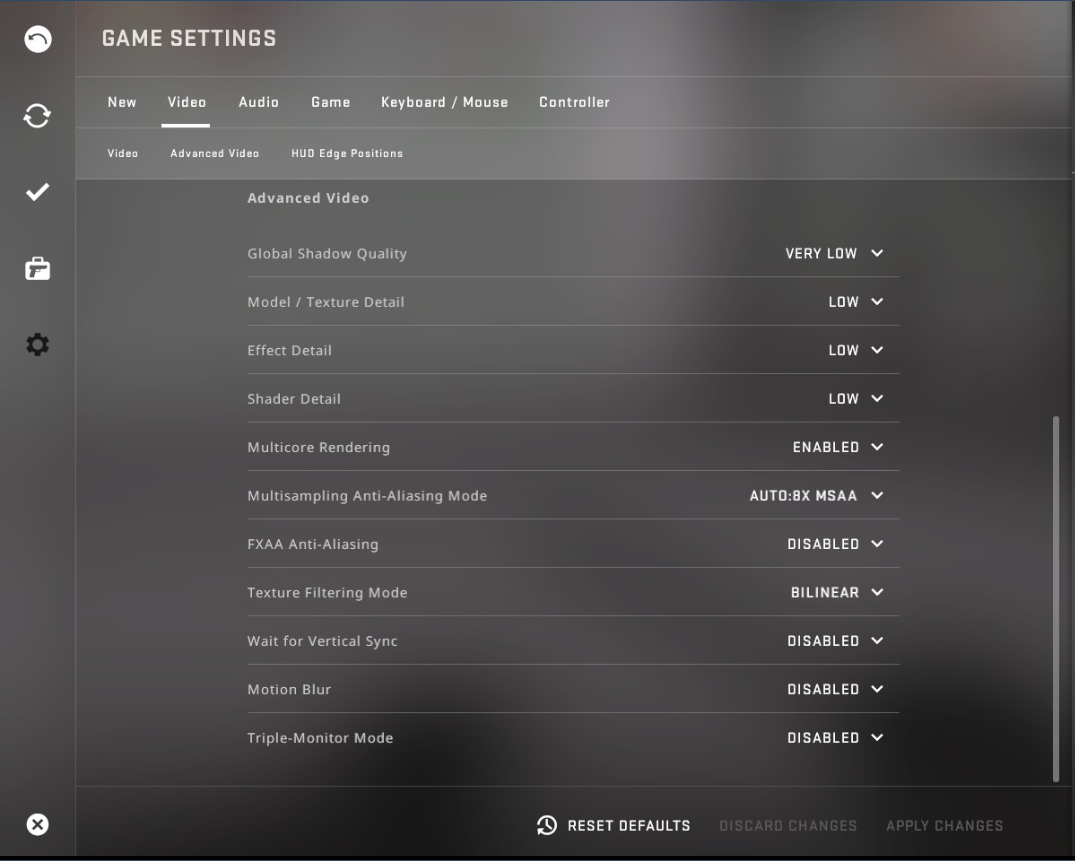
Video Advanced
| Global Shadow Quality | - |
| Model / Texture Detail | - |
| Texture Streaming | - |
| Effect Detail | - |
| Shader Detail | - |
| Boost Player Contrast | - |
| Multicore Rendering | - |
| Multisampling Anti-Aliasing Mode | - |
| FXAA Anti-Aliasing | - |
| Texture Filtering Mode | - |
| Wait for Vertical Sync | - |
| Motion Blur | - |
| Triple-Monitor Mode | - |
| Use Uber Shaders | - |
Viewmodel
| FOV | - |
| Offset X | - |
| Offset Y | - |
| Offset Z | - |
| Presetpos | - |
| Shift Left Amt | - |
| Shift Right Amt | - |
| Recoil | - |
| Righthand | - |
Viewmodel commands
Launch Options
Mouse
| DPI | - |
| Sensitivity | 1.545 |
| eDPI | - |
| Windows Sensitivity | - |
| Zoom Sensitivity | - |
| Raw Input | - |
| Acceleration | - |
Crosshair
| Draw Outline | - |
| Alpha | - |
| Color | Yello |
| Blue | - |
| Green | - |
| Red | - |
| Dot | - |
| Gap | - |
| Size | 2 |
| Style | - |
| Thickness | - |
| Sniper | - |
Crosshair commands
cl_crosshaircolor Yello; cl_crosshairsize 2;
cl_bob
| Lower Amt | - |
| Amt Lat | - |
| Amt Vert | - |
| Cycle | - |
cl_bob commands
HUD
Radar
FAQ
Which monitor is Ompah 2020 using?
The primary monitor of Ompah 2020 is the ZOWIE XL2546.
Summary
This page contains the in-game settings, config files (cfg) and hardware setup of Ompah 2020. The Ompah 2020 cs2 settings page has been viewed for 1.341 since it was added on 2020-03-09. The last time the settings of Ompah 2020 were on 2020-03-09. Visit the cs2 settings page to view more Counter-Strike 2 settings like Ompah 2020 or visit upload section to add your own cs2 settings.
Other Counter-Strike 2 settings
| # | Name | Country | Last Update | |
| 1 | |  Romania Romania | 2024-04-16 | |
| 2 | |  Russia Russia | 2020-02-04 | |
| 3 | |  Finland Finland | 2024-05-10 | |
| 4 | |  South Africa South Africa | 2021-04-02 | |
| 5 | |  Bulgaria Bulgaria | 2024-04-03 |
Other Sweden gaming settings
| # | Name | Country | Last Update | |
| 1 | | Sweden | 2021-09-22 | |
| 2 |  | Sweden | 2024-02-16 | |
| 3 |  | Sweden | 2024-05-05 | |
| 4 | | Sweden | 2020-02-02 | |
| 5 | | Sweden | 2020-08-27 | |
| 6 | | Sweden | 2024-03-03 | |
| 7 |  | Sweden | 2024-03-16 | |
| 8 | | Sweden | 2025-08-08 | |
| 9 | | Sweden | 2023-02-03 | |
| 10 | | Sweden | 2024-02-20 |
Ompah 2020 CFG file
1. Main Settings
con_enable 1 Enables Console
gameinstructor_enable 0 Removes in-game instructions
cl_showhelp 0 Removes on-screen help
cl_autohelp 0 Removes automatic help
cl_disablefreezecam 1 Disables Freezecam
cl_forcepreload 1 Preloads map, improves FPS but may increase map loading times
cl_join_advertise 2 Let friends join your community servers
lobby_default_privacy_bits1 0 Set default lobby permissions to friends need invite
2. Bindings
bind ESCAPE cancelselect
bind + toggleconsole 1
bind TAB +showscores
bind SPACE +jump
bind 0 slot10
bind 1 slot1
bind 2 slot2
bind 3 slot3
bind 4 slot4
bind 5 slot5
bind 6 slot6
bind 7 slot7
bind 8 slot8
bind 9 slot9
bind a +moveleft
bind v buymenu
bind d +moveright
bind e +use
bind f +lookatweapon
bind g drop
bind i show_loadout_toggle
bind m teammenu
bind r +reload
bind s +back
bind u messagemode2
bind w +forward
bind x radio2
bind y messagemode
bind z radio1
bind CTRL +duck
bind SHIFT +speed
bind F10 quit prompt
bind MOUSE1 +attack
bind MOUSE2 +attack2
bind PAUSE pause
bind DEL mute
bind t +spray_menu
bind MWHEELDOWN +jump
bind MWHEELUP +jump
sensitivity 1.545
bind , "volume 0.4"
bind . "volume 0"
alias "+jumpthrow" "+jump;-attack"
alias "-jumpthrow" "-jump"
bind "alt" "+jumpthrow"
bind c "r_cleardecals"
3. Crosshair
cl_crosshair_drawoutline "0"
cl_crosshair_dynamic_maxdist_splitratio "q"
cl_crosshair_dynamic_splitalpha_innermod "1"
cl_crosshair_dynamic_splitalpha_outermod "0.5"
cl_crosshair_dynamic_splitdist "5"
cl_crosshair_friendly_warning "1"
cl_crosshair_outlinethickness "1"
cl_crosshair_sniper_show_normal_inaccuracy "0"
cl_crosshair_sniper_width "1"
cl_crosshair_t "0"
cl_crosshairalpha "255"
cl_crosshaircolor "2"
cl_crosshaircolor_b "144"
cl_crosshaircolor_g "255"
cl_crosshaircolor_r "255"
cl_crosshairdot "0"
cl_crosshairgap "-3"
cl_crosshairgap_useweaponvalue "0"
cl_crosshairsize "2"
cl_crosshairstyle "4"
cl_crosshairthickness "1"
cl_crosshairusealpha "1"
cl_fixedcrosshairgap "-5"
4. Hud
cl_bob_lower_amt "5.000000"
cl_bobamt_lat "0.1"
cl_bobamt_vert "0.1"
cl_bobcycle "0.980000"
cl_hud_background_alpha "0"
cl_hud_bomb_under_radar "1"
cl_hud_color "7"
cl_hud_healthammo_style "1"
cl_hud_playercount_pos "1"
cl_hud_playercount_showcount "1"
cl_hud_radar_scale "0.905000"
hud_scaling "0.950000"
hud_showtargetid "1"
5. Radar
cl_radar_always_centered 0 // Centers map instead of player
cl_radar_scale 0.5 // Make the radar look zoomed out
cl_hud_radar_scale 1
7. Viewmodel
viewmodel_fov "68.000000"
viewmodel_offset_x "2.5"
viewmodel_offset_y "-2"
viewmodel_offset_z "-1.500000"
viewmodel_presetpos "0"
viewmodel_recoil "0"
9. Video
fps_max 0 Max frames per second, setting it to 0 causes long loading times
fps_max_menu 245 Max frames per second in main-menu
mat_powersavingsmode 0 Disables power saving mode
mat_monitorgamma_tv_enabled 0 Turn off TV Mode for less off-set light
10. Sound
voice_scale 0.5 Turns down the volume of other players voice to 40%
11. Other
lobby_voice_chat_enabled 0 Turns microphone off in lobby, really useful
cl_use_opens_buy_menu 0 Disables E from opening buy-menu, really useful
cl_autowepswitch 0 Disable auto-weapon switch
mm_dedicated_search_maxping 50 Maxping Search in Matchmaking
func_break_max_pieces 0 Less clutter from breaking vents (especially on Mirage)
echo Ompah.EXE LOADED(22) This just confirms that the config has ended successfully
Top 10 Games


New Setups
New Configs
Updated Gear
Updated Configs