Hypiore cfg 2022 cs2 settings, config & cfg 2022
| Full Name | - |
| Nickname | Hypiore cfg 2022 |
| Birthday | - |
| Nationality |  Germany Germany |
| Game |  Counter-Strike 2 Counter-Strike 2 |
| Since | 2022-05-20 |
| Last Update | 2022-05-20 |
Hypiore cfg 2022 screenshot
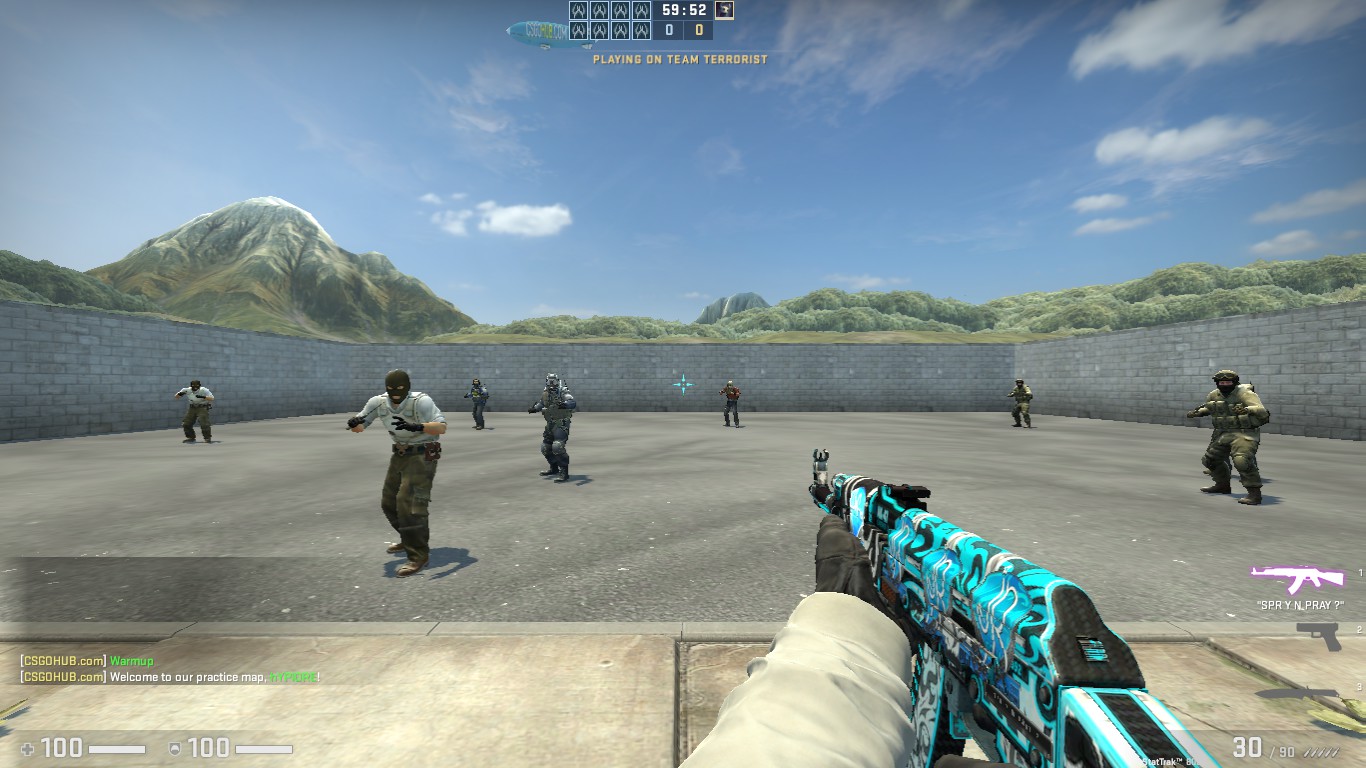
Hypiore cfg 2022 Gear
| Mouse | - |
| Mousepad | - |
| Keyboard | - |
| Headset | - |
| Earbuds | - |
| Monitor | - |
| Chair | - |
| Controller | - |
| Case | - |
Hypiore cfg 2022 Gaming PC Setup
| GPU | - |
| CPU | - |
| Memory | - |
| Motherboard | - |
| Power Supply | - |
| Storage | - |
| Fan | - |
| Cooler | - |
Hypiore cfg 2022 config
The Counter-Strike 2 config file of Hypiore cfg 2022 has been downloaded 55 times. Download autoexec.cfg by clicking the download button below.
How to install Hypiore cfg 2022 cs2 config
1. Download autoexec.cfg by clicking the download button above.
2. Extract and/or copy file(s) into your Counter-Strike 2 folder (Example: C:\Program Files (x86)\Steam\userdata\STEAMID\730\local\cfg).
3. Launch the game and type in "exec configname.cfg" in console to load the config or make sure to add "exec autoexec.cfg", "exec userconfig.cfg" or "exec Hypiore cfg 2022.cfg" to config.cfg file in your Counter-Strike 2 folder.
2. Extract and/or copy file(s) into your Counter-Strike 2 folder (Example: C:\Program Files (x86)\Steam\userdata\STEAMID\730\local\cfg).
3. Launch the game and type in "exec configname.cfg" in console to load the config or make sure to add "exec autoexec.cfg", "exec userconfig.cfg" or "exec Hypiore cfg 2022.cfg" to config.cfg file in your Counter-Strike 2 folder.
Social Media
| Twitch | - |
| - | |
| YouTube | - |
| - | |
| - | |
| TikTok | - |
| Steam | - |
| Discord | - |
Hypiore cfg 2022 Settings
Monitor
| Resolution | 1366x768 |
| Aspect Ratio | 16:9 |
| Display Mode | - |
| Brightness | - |
| Color Mode | - |
Video Advanced
| Global Shadow Quality | - |
| Model / Texture Detail | - |
| Texture Streaming | - |
| Effect Detail | - |
| Shader Detail | - |
| Boost Player Contrast | - |
| Multicore Rendering | - |
| Multisampling Anti-Aliasing Mode | - |
| FXAA Anti-Aliasing | - |
| Texture Filtering Mode | - |
| Wait for Vertical Sync | - |
| Motion Blur | - |
| Triple-Monitor Mode | - |
| Use Uber Shaders | - |
Viewmodel
| FOV | - |
| Offset X | - |
| Offset Y | - |
| Offset Z | - |
| Presetpos | - |
| Shift Left Amt | - |
| Shift Right Amt | - |
| Recoil | - |
| Righthand | - |
Viewmodel commands
Launch Options
Mouse
| DPI | - |
| Sensitivity | 2 |
| eDPI | - |
| Windows Sensitivity | - |
| Zoom Sensitivity | - |
| Raw Input | - |
| Acceleration | - |
Crosshair
| Draw Outline | - |
| Alpha | - |
| Color | - |
| Blue | - |
| Green | - |
| Red | - |
| Dot | - |
| Gap | - |
| Size | - |
| Style | - |
| Thickness | - |
| Sniper | - |
Crosshair commands
cl_bob
| Lower Amt | - |
| Amt Lat | - |
| Amt Vert | - |
| Cycle | - |
cl_bob commands
HUD
Radar
FAQ
Summary
This page contains the in-game settings, config files (cfg) and hardware setup of Hypiore cfg 2022. The Hypiore cfg 2022 cs2 settings page has been viewed for 1.755 since it was added on 2022-05-20. The last time the settings of Hypiore cfg 2022 were on 2022-05-20. Visit the cs2 settings page to view more Counter-Strike 2 settings like Hypiore cfg 2022 or visit upload section to add your own cs2 settings.
Other Counter-Strike 2 settings
| # | Name | Country | Last Update | |
| 1 | |  Portugal Portugal | 2021-09-21 | |
| 2 | |  Kosovo Kosovo | 2025-09-11 | |
| 3 | |  Saudi Arabia Saudi Arabia | 2020-06-22 | |
| 4 | |  Brazil Brazil | 2022-05-31 | |
| 5 | |  Iraq Iraq | 2024-04-26 |
Other Germany gaming settings
| # | Name | Country | Last Update | |
| 1 |  | Germany | 2024-03-14 | |
| 2 |  | Germany | 2024-05-02 | |
| 3 | | Germany | 2020-01-11 | |
| 4 |  | Germany | 2022-10-04 | |
| 5 | | Germany | 2020-12-09 | |
| 6 | | Germany | 2021-08-08 | |
| 7 | | Germany | 2024-05-02 | |
| 8 |  | Germany | 2024-07-03 | |
| 9 | | Germany | 2021-05-06 | |
| 10 | | Germany | 2024-04-07 |
Hypiore cfg 2022 CFG file
// Content
// 0. Console
// 1. Hud
// 2. Radar
// 3. Zoom Sensitivity
// 4. Viewmodel
// 5. Bob
// 6. Network
// 7. Netgraph
// 8. Other
// 9. Scripts
//-------- 0. Console
cl_color 3 // 0 = yellow, 1 = purple, 2 = green, 3 = blue, 4 = orange
log_color General ffff00ff
//-------- 1. Hud
cl_disablefreezecam "1" //Freezecam (Rec: Enabled)
//--------- 2. Radar
cl_hud_radar_scale "1.1"
cl_radar_always_centered "0"
cl_radar_icon_scale_min "0.7"
cl_radar_rotate "1"
cl_radar_scale "0.3"
//---------- 3. Sensitivity
sensitivity 2
zoom_sensitivity_ratio_mouse "0.818933027098955175" //Adjusts your zoom sensitivity to act as your true sensitivity (Default: 1)
//----------- 4. Viewmodel (Forced + Personal preference)
cl_righthand "1" //Move your gun to your left or right hand (Default: 1 = RIGHT)
viewmodel_presetpos "0" //Force custom viewmodel
viewmodel_offset_x "2" //Changes viewmodel view in X scale (-2 to 3)
viewmodel_offset_y "2" //Changes viewmodel view in Y scale (-2 to 2)
viewmodel_offset_z "-2" //Changes viewmodel view in Z scale (-2 to 2)
viewmodel_fov "68" //Highest viewmodel FOV (54 to 68)
viewmodel_recoil "0" //Amount of weapon recoil/aimpunch to display on viewmodel (Default: 1)
//------------ 5. Bob (Viewmodel movement)
cl_bob_lower_amt "0" //Viewmodel lowers when running (5 - 30 Default: 21)
cl_bobamt_lat "0" //Viewmodel moves side to side when running (0.1 - 2 Default: 0.4)
cl_bobamt_vert "0" //Viewmodel moves up and down when running, set to lowest for less distraction
cl_viewmodel_shift_left_amt "0" //Crouching animation moving left (0.5 - 2 Default: 1.5)
cl_viewmodel_shift_right_amt "0" //Crouching animation moving right (0.25 - 2 Default: 0.75)
//------------- 6. Network (settings are optimized for fastest connection)
rate "786432" //Your download rate to the server (Max rate: 786432 Default: 196608)
cl_cmdrate "128" //Number of command packets sent to server per second (Max: 128 Default: 64)
cl_updaterate "128" //Number of packets per second you are requesting from the server (Max: 128 Default: 64)
cl_interp_ratio "1" //Sets the interpolation amount (Default: 2)
cl_interp "0"
cl_lagcompensation "1"
cl_predict "0"
cl_predictweapons "1"
//-------------- 7. Netgraph
net_graph "1" //Netgraph (Default: 0)
net_graphheight "0" //Height of netgraph (Default: 64)
net_graphpos "2" //Positioning of netgraph (Default: 1)
net_graphproportionalfont "1" //Proportionate font size for netgraph (Default: 0)
net_graphmsecs "400"
net_graphpos "2"
net_graphproportionalfont "0"
net_graphshowinterp "1"
net_graphshowlatency "1"
net_graphsolid "1"
net_graphtext "1"
net_maxroutable "1200"
net_scale "5"
//--------------- 8. Other
r_drawtracers_firstperson "0" //Hide first person tracers, does not hide other players tracers (Default: 1)
cl_parachute_autodeploy "1" //Automatically deploy parachute in Danger Zone (Default: 1)
demo_index "1" //Demo watching index (Rec: 1 Default: 0)
cl_join_advertise "2" //Allow friends to join your community servers via friends list (Rec: 2 Default: 0)
//---------------- 9. Scripts
// Jumpthrow (For Nades)
alias "+jumpthrow" "+jump; -attack"
alias "-jumpthrow" "-jump"
bind "Capslock" "+jumpthrow" //Bind to jumpthrow
// Qualify of life shortcuts for console commands
alias "d" "disconnect"
alias "q" "quit"
alias "r" "retry"
alias "rs" "mp_restartgame 1"
// Toggle netgraph
alias "togglenet" "togglenet_on"
alias "togglenet_on" "net_graph 1; alias togglenet "togglenet_off""
alias "togglenet_off" "net_graph 0; alias togglenet "togglenet_on""
// lowers delay between sounds.
snd_mixahead "0.05"
snd_mix_async "1"
voice_mixer_volume -1
voice_scale 0.2
voice_enable 1
sv_forcepreload "0"
cl_autohelp "0"
cl_disablehtmlmotd "1"
cl_showhelp "0"
cl_downloadfilter "nosounds"
r_dynamic "0"
r_drawtracers "0"
r_drawtracers_firstperson "0"
r_eyegloss "0"
r_eyemove "0"
r_eyeshift_x "0"
r_eyeshift_y "0"
r_eyeshift_z "0"
r_eyesize "0"
//alias
alias "playpause" "demplay" //demo Pause&Resume
alias "demplay" "demo_togglepause; alias playpause dempause"
alias "dempause" "demo_resume; alias playpause demplay"
alias "crosshairchanger" "crosshair0" //switching between crosshairs
alias "crosshair0" "cl_crosshairstyle 2; cl_crosshairalpha "255"; cl_crosshairgap -4 ;cl_crosshairthickness 6.1 ;cl_crosshair_drawoutline 0 ;cl_crosshairsize 1 ;cl_crosshairdot 0 ;cl_crosshair_dynamic_maxdist_splitratio 0.9 ;cl_crosshair_dynamic_splitalpha_outermod 0.3 ;cl_crosshair_dynamic_splitdist 0.6 ;cl_crosshaircolor 5 ;cl_crosshaircolor_b 255 ;cl_crosshaircolor_g 255 ;cl_crosshaircolor_r 0 ;alias crosshairchanger crosshair1"
alias "crosshair1" "cl_crosshairstyle 4; cl_crosshairalpha "255"; cl_crosshairgap -3 ;cl_crosshairsize 1 ;cl_crosshairthickness 0.0000001 ;cl_crosshair_drawoutline 0 ;cl_crosshairdot 1 ;cl_crosshair_dynamic_maxdist_splitratio 0.3 ;cl_crosshair_dynamic_splitalpha_innermod 1 ;cl_crosshair_dynamic_splitalpha_outermod 0.5 ;cl_crosshair_dynamic_splitdist 7 ;cl_crosshairusealpha 1 ;cl_crosshairalpha 255 ;cl_crosshaircolor 4 ;alias crosshairchanger crosshair2"
alias "crosshair2" "cl_crosshairstyle 1; cl_crosshair_drawoutline 1; cl_crosshair_dynamic_maxdist_splitratio 0.9; cl_crosshair_dynamic_splitalpha_innermod 1; cl_crosshair_dynamic_splitalpha_outermod 0.3; cl_crosshair_dynamic_splitdist 0.6; cl_crosshairalpha 255; cl_crosshaircolor 3; cl_crosshairgap_useweaponvalue 0; cl_crosshairsize 4; cl_crosshairusealpha 1; cl_fixedcrosshairgap -14; alias crosshairchanger crosshair3"
alias "crosshair3" "cl_crosshairstyle 5; cl_crosshaircolor 4; cl_crosshairalpha 160; cl_crosshairdot 1; cl_crosshairgap -1; cl_crosshair_dynamic_maxdist_splitratio 0.35; cl_crosshair_dynamic_splitalpha_innermod 1; cl_crosshair_dynamic_splitalpha_outermod 0.5; cl_crosshair_dynamic_splitdist 7; cl_crosshair_outlinethickness 1; cl_crosshair_drawoutline 1; cl_crosshairsize .8; alias crosshairchanger crosshair4"
alias "crosshair4" "cl_crosshair_drawoutline 0; cl_crosshair_dynamic_maxdist_splitratio 0.5; cl_crosshair_dynamic_splitalpha_innermod 1; cl_crosshair_dynamic_splitalpha_outermod 1; cl_crosshair_dynamic_splitdist 2.5; cl_crosshairalpha 255; cl_crosshaircolor 4; cl_crosshairscale 200; cl_crosshairsize 2; cl_crosshairstyle 1; cl_crosshairthickness 1; cl_fixedcrosshairgap -7; alias crosshairchanger crosshair0"
bind "." crosshairchanger
// binds
bind alt "+lookatweapon; r_cleardecals"
bind mwheeldown "+jump"
bind mwheelup "slot6"
bind f "slot7"
bind c "slot8"
bind v "slot10"
//demobinds
bind "pgup" "demo_gototick -768 relative" // 128tick=6 secs back 64tick= 12 secs. aso.
bind "kp_end" "demo_timescale 0.1; sv_showimpacts_time 0.1"
bind "kp_downarrow" "demo_timescale 0.4; sv_showimpacts_time 0.4"
bind "kp_pgdn" "demo_timescale 0.8; sv_showimpacts_time 0.8"
bind "kp_5" "playpause"
bind "kp_home" "toggle weapon_debug_spread_show" // show weapon inaccuracy/spread
bind "kp_uparrow" "incrementvar r_drawothermodels 1 2 1" // kind of like x-ray
bind "kp_minus" "demo_timescale 2" //fastforward 2
bind "kp_plus" "demo_timescale 4" //fastforward 4
bind "kp_enter" "demo_timescale 1; sv_showimpacts_time 1" // Normal speed
bind "UPARROW" "fov_cs_debug 33" // zoom view in
bind "DOWNARROW" "fov_cs_debug 0" // zoom view out
//CH
CSGO-WvSie-RRZiv-y4YaW-y6RJq-MyedJ
CSGO-nnFAa-uMEai-oCufO-mkY85-tXcNE
//---------------- Final part
host_writeconfig //Useful for forcing viewmodel settings
// 0. Console
// 1. Hud
// 2. Radar
// 3. Zoom Sensitivity
// 4. Viewmodel
// 5. Bob
// 6. Network
// 7. Netgraph
// 8. Other
// 9. Scripts
//-------- 0. Console
cl_color 3 // 0 = yellow, 1 = purple, 2 = green, 3 = blue, 4 = orange
log_color General ffff00ff
//-------- 1. Hud
cl_disablefreezecam "1" //Freezecam (Rec: Enabled)
//--------- 2. Radar
cl_hud_radar_scale "1.1"
cl_radar_always_centered "0"
cl_radar_icon_scale_min "0.7"
cl_radar_rotate "1"
cl_radar_scale "0.3"
//---------- 3. Sensitivity
sensitivity 2
zoom_sensitivity_ratio_mouse "0.818933027098955175" //Adjusts your zoom sensitivity to act as your true sensitivity (Default: 1)
//----------- 4. Viewmodel (Forced + Personal preference)
cl_righthand "1" //Move your gun to your left or right hand (Default: 1 = RIGHT)
viewmodel_presetpos "0" //Force custom viewmodel
viewmodel_offset_x "2" //Changes viewmodel view in X scale (-2 to 3)
viewmodel_offset_y "2" //Changes viewmodel view in Y scale (-2 to 2)
viewmodel_offset_z "-2" //Changes viewmodel view in Z scale (-2 to 2)
viewmodel_fov "68" //Highest viewmodel FOV (54 to 68)
viewmodel_recoil "0" //Amount of weapon recoil/aimpunch to display on viewmodel (Default: 1)
//------------ 5. Bob (Viewmodel movement)
cl_bob_lower_amt "0" //Viewmodel lowers when running (5 - 30 Default: 21)
cl_bobamt_lat "0" //Viewmodel moves side to side when running (0.1 - 2 Default: 0.4)
cl_bobamt_vert "0" //Viewmodel moves up and down when running, set to lowest for less distraction
cl_viewmodel_shift_left_amt "0" //Crouching animation moving left (0.5 - 2 Default: 1.5)
cl_viewmodel_shift_right_amt "0" //Crouching animation moving right (0.25 - 2 Default: 0.75)
//------------- 6. Network (settings are optimized for fastest connection)
rate "786432" //Your download rate to the server (Max rate: 786432 Default: 196608)
cl_cmdrate "128" //Number of command packets sent to server per second (Max: 128 Default: 64)
cl_updaterate "128" //Number of packets per second you are requesting from the server (Max: 128 Default: 64)
cl_interp_ratio "1" //Sets the interpolation amount (Default: 2)
cl_interp "0"
cl_lagcompensation "1"
cl_predict "0"
cl_predictweapons "1"
//-------------- 7. Netgraph
net_graph "1" //Netgraph (Default: 0)
net_graphheight "0" //Height of netgraph (Default: 64)
net_graphpos "2" //Positioning of netgraph (Default: 1)
net_graphproportionalfont "1" //Proportionate font size for netgraph (Default: 0)
net_graphmsecs "400"
net_graphpos "2"
net_graphproportionalfont "0"
net_graphshowinterp "1"
net_graphshowlatency "1"
net_graphsolid "1"
net_graphtext "1"
net_maxroutable "1200"
net_scale "5"
//--------------- 8. Other
r_drawtracers_firstperson "0" //Hide first person tracers, does not hide other players tracers (Default: 1)
cl_parachute_autodeploy "1" //Automatically deploy parachute in Danger Zone (Default: 1)
demo_index "1" //Demo watching index (Rec: 1 Default: 0)
cl_join_advertise "2" //Allow friends to join your community servers via friends list (Rec: 2 Default: 0)
//---------------- 9. Scripts
// Jumpthrow (For Nades)
alias "+jumpthrow" "+jump; -attack"
alias "-jumpthrow" "-jump"
bind "Capslock" "+jumpthrow" //Bind to jumpthrow
// Qualify of life shortcuts for console commands
alias "d" "disconnect"
alias "q" "quit"
alias "r" "retry"
alias "rs" "mp_restartgame 1"
// Toggle netgraph
alias "togglenet" "togglenet_on"
alias "togglenet_on" "net_graph 1; alias togglenet "togglenet_off""
alias "togglenet_off" "net_graph 0; alias togglenet "togglenet_on""
// lowers delay between sounds.
snd_mixahead "0.05"
snd_mix_async "1"
voice_mixer_volume -1
voice_scale 0.2
voice_enable 1
sv_forcepreload "0"
cl_autohelp "0"
cl_disablehtmlmotd "1"
cl_showhelp "0"
cl_downloadfilter "nosounds"
r_dynamic "0"
r_drawtracers "0"
r_drawtracers_firstperson "0"
r_eyegloss "0"
r_eyemove "0"
r_eyeshift_x "0"
r_eyeshift_y "0"
r_eyeshift_z "0"
r_eyesize "0"
//alias
alias "playpause" "demplay" //demo Pause&Resume
alias "demplay" "demo_togglepause; alias playpause dempause"
alias "dempause" "demo_resume; alias playpause demplay"
alias "crosshairchanger" "crosshair0" //switching between crosshairs
alias "crosshair0" "cl_crosshairstyle 2; cl_crosshairalpha "255"; cl_crosshairgap -4 ;cl_crosshairthickness 6.1 ;cl_crosshair_drawoutline 0 ;cl_crosshairsize 1 ;cl_crosshairdot 0 ;cl_crosshair_dynamic_maxdist_splitratio 0.9 ;cl_crosshair_dynamic_splitalpha_outermod 0.3 ;cl_crosshair_dynamic_splitdist 0.6 ;cl_crosshaircolor 5 ;cl_crosshaircolor_b 255 ;cl_crosshaircolor_g 255 ;cl_crosshaircolor_r 0 ;alias crosshairchanger crosshair1"
alias "crosshair1" "cl_crosshairstyle 4; cl_crosshairalpha "255"; cl_crosshairgap -3 ;cl_crosshairsize 1 ;cl_crosshairthickness 0.0000001 ;cl_crosshair_drawoutline 0 ;cl_crosshairdot 1 ;cl_crosshair_dynamic_maxdist_splitratio 0.3 ;cl_crosshair_dynamic_splitalpha_innermod 1 ;cl_crosshair_dynamic_splitalpha_outermod 0.5 ;cl_crosshair_dynamic_splitdist 7 ;cl_crosshairusealpha 1 ;cl_crosshairalpha 255 ;cl_crosshaircolor 4 ;alias crosshairchanger crosshair2"
alias "crosshair2" "cl_crosshairstyle 1; cl_crosshair_drawoutline 1; cl_crosshair_dynamic_maxdist_splitratio 0.9; cl_crosshair_dynamic_splitalpha_innermod 1; cl_crosshair_dynamic_splitalpha_outermod 0.3; cl_crosshair_dynamic_splitdist 0.6; cl_crosshairalpha 255; cl_crosshaircolor 3; cl_crosshairgap_useweaponvalue 0; cl_crosshairsize 4; cl_crosshairusealpha 1; cl_fixedcrosshairgap -14; alias crosshairchanger crosshair3"
alias "crosshair3" "cl_crosshairstyle 5; cl_crosshaircolor 4; cl_crosshairalpha 160; cl_crosshairdot 1; cl_crosshairgap -1; cl_crosshair_dynamic_maxdist_splitratio 0.35; cl_crosshair_dynamic_splitalpha_innermod 1; cl_crosshair_dynamic_splitalpha_outermod 0.5; cl_crosshair_dynamic_splitdist 7; cl_crosshair_outlinethickness 1; cl_crosshair_drawoutline 1; cl_crosshairsize .8; alias crosshairchanger crosshair4"
alias "crosshair4" "cl_crosshair_drawoutline 0; cl_crosshair_dynamic_maxdist_splitratio 0.5; cl_crosshair_dynamic_splitalpha_innermod 1; cl_crosshair_dynamic_splitalpha_outermod 1; cl_crosshair_dynamic_splitdist 2.5; cl_crosshairalpha 255; cl_crosshaircolor 4; cl_crosshairscale 200; cl_crosshairsize 2; cl_crosshairstyle 1; cl_crosshairthickness 1; cl_fixedcrosshairgap -7; alias crosshairchanger crosshair0"
bind "." crosshairchanger
// binds
bind alt "+lookatweapon; r_cleardecals"
bind mwheeldown "+jump"
bind mwheelup "slot6"
bind f "slot7"
bind c "slot8"
bind v "slot10"
//demobinds
bind "pgup" "demo_gototick -768 relative" // 128tick=6 secs back 64tick= 12 secs. aso.
bind "kp_end" "demo_timescale 0.1; sv_showimpacts_time 0.1"
bind "kp_downarrow" "demo_timescale 0.4; sv_showimpacts_time 0.4"
bind "kp_pgdn" "demo_timescale 0.8; sv_showimpacts_time 0.8"
bind "kp_5" "playpause"
bind "kp_home" "toggle weapon_debug_spread_show" // show weapon inaccuracy/spread
bind "kp_uparrow" "incrementvar r_drawothermodels 1 2 1" // kind of like x-ray
bind "kp_minus" "demo_timescale 2" //fastforward 2
bind "kp_plus" "demo_timescale 4" //fastforward 4
bind "kp_enter" "demo_timescale 1; sv_showimpacts_time 1" // Normal speed
bind "UPARROW" "fov_cs_debug 33" // zoom view in
bind "DOWNARROW" "fov_cs_debug 0" // zoom view out
//CH
CSGO-WvSie-RRZiv-y4YaW-y6RJq-MyedJ
CSGO-nnFAa-uMEai-oCufO-mkY85-tXcNE
//---------------- Final part
host_writeconfig //Useful for forcing viewmodel settings
Top 10 Games


New Setups
New Configs


Updated Gear
Updated Configs